Adding Unlimited Pages in Blogger
But obviously there is a workaround that allows you to bypass this blogger pages limitation and allow you to create unlimited pages across all your blogger blogs. So now if you are interested then lets get started.- Open Blogger > Pages and create new Page by selecting the New Page option & selecting Blank Page.
- Now you can easily give name to that page and add content to it by going into the HTML section of that page.
- Now by default you will only be able to create 20 pages, so that limit is good but still if you want to create more pages then check below.
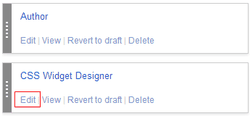 Now just press Edit on any page like in the image on the right.
 - Now you will see a new page open up with your page contents displayed.
- Well just select and copy URL of that page that will look something like below. http://draft.blogger.com/blogger.g?blogID=1234567890123456789#editor/target=page;pageID=1234567890123456789
- Now you have the URL copied go back and delete that page, don't worry we will restore that page in seconds with full content.
- Now just create another page you want using simple New Page option, and add all the content now after you have completed creating that new page.
- Just paste the copied URL of older page into your browser which will show you that same page with name and all content just press on Update to restore that page.
 Now just press Edit on any page like in the image on the right.
 www.internetformm.com
